Flash Weather AI: Future Radar
FLASH Weather AIWeather
3.851.00 Reviews
- Version
- 1.5.175
- Installs
- 10.00K
- Age Rating
- Everyone
Screenshots
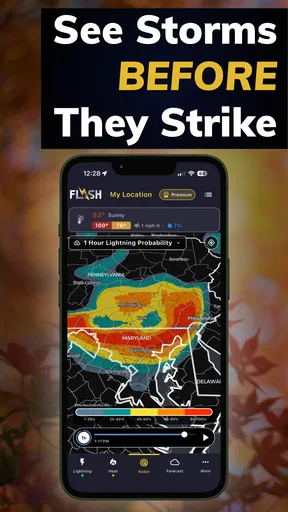
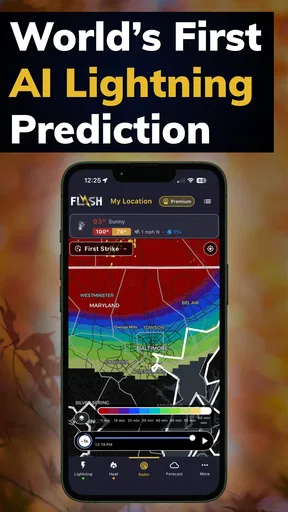
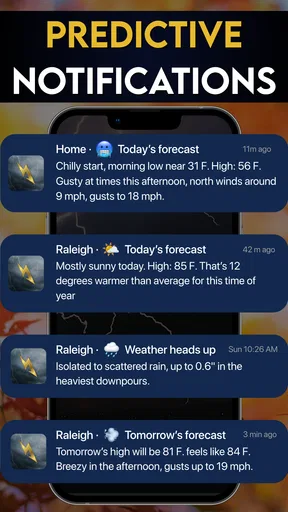
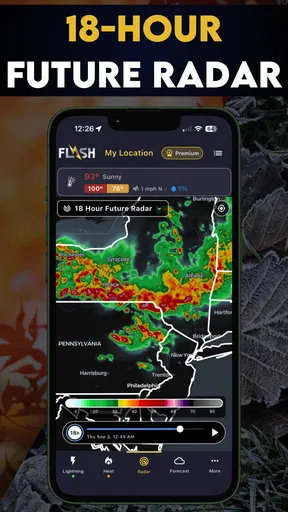
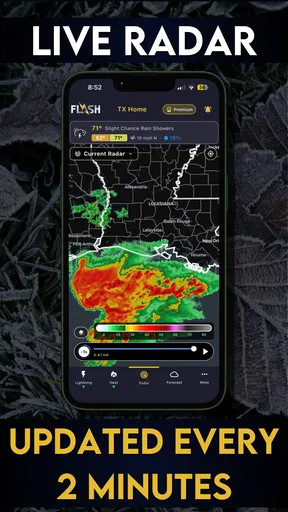
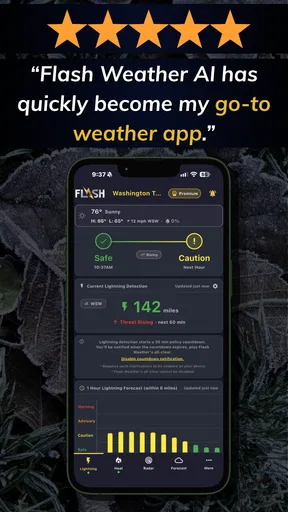
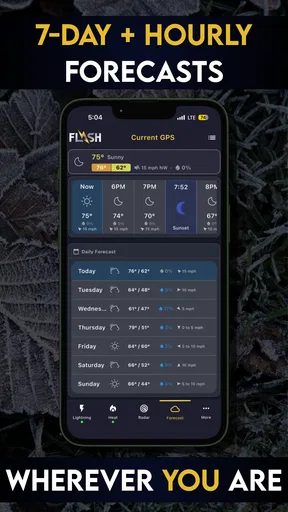
Our Review of Flash Weather AI: Future Radar
 Analysis by Appyee
Weather apps usually answer a simple question: what is happening outside now, and what might happen later? Flash Weather AI: Future Radar takes a narrower, more urgent approach. It is a free weather app from FLASH Weather AI built around lightning prediction and storm tracking, so its value becomes clearest when ordinary forecasts feel too general. I found it most useful as a quick decision tool before going outside, rather than as a complete replacement for every weather service on my phone.
The app is aimed at people who care about changing storm conditions: walkers, cyclists, outdoor workers, parents planning activities, and anyone who would rather check a developing threat than rely only on a morning forecast. Its store positioning presents it as an AI-powered lightning prediction and storm tracker, but the practical question is more important: can it help you decide whether to continue, delay, or move indoors? In my experience, that is the standard it should be judged by.
What to expect when you open it
The first thing to understand is that this is not simply another temperature-and-seven-day-forecast app. A normal weather app is often better for planning clothing, checking the weekend, or comparing broad conditions across several days. Flash Weather AI: Future Radar is more focused on the immediate risk around storms and lightning. That focus can make it feel more useful in a tense weather moment, but less complete if you want a full household weather dashboard.
The app belongs to the weather category and is available at no upfront cost. It is suitable for Everyone, which makes the straightforward storm-tracking purpose accessible to a wide range of users. The developer is FLASH Weather AI, and the app has reached over ten thousand installs. Its average rating is 3.8 from around ninety ratings, with reviews from roughly fifty users, so I would treat it as a developing product rather than a universally proven weather standard.
That rating also sets a sensible expectation. I would not install it assuming it will replace a mature weather service in every situation. Instead, I would use it alongside one. The usual forecast app can remain my source for temperature, rain chances, wind, and longer-range planning, while this app gets opened when lightning or a nearby storm becomes the main concern.
One useful way to think about it is as a second opinion for outdoor decisions. Suppose I am preparing to take a child to a park. A general forecast might say that the day is partly cloudy with a chance of rain. That information is helpful, but it does not fully answer whether I should leave now, stay nearby, or cancel. A storm-focused view can change the decision by drawing attention to the movement and proximity of electrical activity rather than just the percentage chance of rain.
At the same time, I would avoid treating any prediction as permission to ignore visible danger. Weather systems change, local observations can lag, and a phone screen cannot replace common-sense safety decisions. The app is best used to improve awareness, not to justify staying outside when thunder, lightning, flooding, or dangerous wind is already present.
How I would prepare for the first check
Before relying on the app during an important outing, I would open it at home and spend a few minutes learning what its map or storm view is showing. Look for the current location indicator, the storm or lightning information, and any controls that change the time view. The goal is not to memorize every symbol. It is to become comfortable enough that a quick glance later gives you a decision instead of another puzzle.
Location is especially important for a weather tool with a local storm-tracking purpose. If the app asks to use your location, choosing the option that lets it identify your area will generally make the first experience more relevant. If you prefer not to share precise location information, you should expect to do more manual work when checking conditions elsewhere. That trade-off is common with location-based weather services: convenience improves when the app knows where you are.
I also recommend checking the app before you actually need it. Open it during a calm period, identify your area, and compare what you see with the sky outside and with your regular weather app. This is a practical calibration step. It teaches you how quickly the display changes, how much detail is visible at your zoom level, and whether the information is easy for you to interpret under pressure.
The current version is 1.5.175, and the app supports Android 7.0 or later. That broad compatibility is helpful if you use an older Android phone, although performance can still depend on the handset, connection, and how much map information is being displayed. I would keep the first test short and purposeful rather than trying to explore every screen at once.
Finding the first meaningful success
For a first-time user, the best initial success is not merely opening the app. It is answering one concrete question: “Is a storm or lightning risk close enough to change what I am about to do?” Start by allowing the app to center on your area, then inspect the storm information around your planned location. If you are going to a sports field, look at the field rather than only your home. If you are driving to a trail, check the destination as well as the starting point.
This destination habit is one of the most useful adjustments I made. People often check the weather where they are sitting, then travel into different conditions. A storm tracker becomes more valuable when it follows the whole plan. For a short trip, I would check the departure point, route area, and destination before leaving, then repeat the check if the sky changes or the activity lasts longer than expected.
Imagine an everyday Saturday scenario. I am about to cycle for an hour, and the sky is bright but distant thunder is possible. I would open the app, locate the route area, and look for signs that storm activity is approaching or developing nearby. If the pattern appears to be moving toward the route, I would shorten the ride or choose a path with easier access to shelter. If conditions look quiet, I might still carry a normal backup plan rather than assuming the ride is guaranteed to remain safe.
That is where the app can earn a place on my phone: it turns a vague feeling of uncertainty into a repeatable check. It does not need to make a dramatic prediction to be useful. Sometimes the meaningful result is simply realizing that the safest choice is to wait fifteen minutes, move an activity indoors, or avoid a remote section of a route.
For outdoor workers, the workflow can be even more practical. Check before starting, check during a break, and check whenever the weather changes noticeably. A supervisor or team should still follow established safety procedures, but a personal storm view can help an individual notice that conditions deserve attention. I would never use it as the only safety system for a construction site, event, or professional operation.
Where new users may become confused
The phrase “AI-powered” can create unrealistic expectations. I would not read it as a promise that the app can see every lightning strike in real time or predict the exact moment a storm will arrive at one address. Weather prediction is inherently uncertain, and lightning is particularly changeable. The useful interpretation is that the app applies its technology to storm and lightning information; the human still has to judge distance, timing, shelter, and the wider situation.
Another common confusion is the difference between lightning risk and rain. A place can have heavy rain without the same lightning concern, while lightning can remain dangerous even when rainfall seems limited. If I were checking the app before an outdoor activity, I would not stop after seeing a rain-related indication. I would specifically look at the lightning and storm context, then combine it with what I can hear and see locally.
Map-based weather views can also be misread when zoomed too far out. A broad regional picture may make a storm look close even when the important detail is several miles away, or make a small area of activity seem insignificant. I would zoom in enough to relate the display to real landmarks, then zoom out briefly to understand the direction and wider pattern. This two-level check is more informative than staring at one fixed map scale.
Timing is another point worth handling carefully. A prediction is not a schedule. If the app suggests that activity is moving away, I would still wait for safer conditions rather than immediately returning outdoors. If it shows no obvious nearby activity, I would still respond to thunder, sudden wind, or official warnings. The app can support a decision, but it should not overrule direct evidence or local emergency guidance.
There is also a financial detail to understand before spending time inside the app. The download is free, but in-app purchases range from $3.99 to $39.99 per item. That means I would explore the free experience first and decide whether it already solves my problem before considering any paid option. I would not assume that paying is necessary for basic access, nor would I assume that an upgrade automatically makes a prediction more accurate. Read each purchase screen carefully and judge it by the specific function it offers.
This matters because a storm tracker is often an occasional-use tool. Someone who only checks before weekend walks may not get enough value from a higher-priced purchase. A person who spends most days outdoors may evaluate the cost differently, especially if the app becomes part of a regular planning routine. Either way, the right question is not whether the app has paid options, but whether the added capability changes a real decision for you.
How it compares with ordinary weather apps
My usual weather app still wins for broad daily information. If I want to know whether I need a coat, how warm the afternoon will be, or whether tomorrow looks suitable for laundry, a standard forecast layout is usually faster. Those apps often make it easier to scan several days and compare common measurements in one place.
Flash Weather AI: Future Radar has a different advantage: it encourages me to focus on storm movement and lightning rather than treating all weather as one general condition. That difference is meaningful when the decision is about shelter and timing. I would choose it over a basic forecast when a picnic, game, hike, ride, or outdoor job depends on whether electrical activity is approaching.
Radar services can be more useful for users who want to study rain bands, wind patterns, and detailed precipitation movement. A dedicated warning service may be preferable when official alerts and emergency communication are the priority. This app sits between those habits: more specialized than a simple forecast, but not something I would automatically treat as a complete emergency-warning replacement.
The trade-off is simplicity versus scope. A focused lightning tracker can reduce the amount of irrelevant information I need to scan, but it may leave me reaching for another app when I need temperatures, air quality, pollen, tides, or a detailed multi-day outlook. I see that as a reason to pair tools intelligently, not necessarily as a flaw. The mistake would be expecting one specialized screen to cover every weather question.
Who will get the most from it
I think the app is a good fit for people whose plans are often interrupted by storms. Outdoor fitness enthusiasts can use it before choosing a route. Families can check conditions before heading to a playground. Event organizers can add a storm-focused check to their routine, while travelers can inspect a destination before leaving the hotel. Even a casual user may appreciate having a dedicated place to look when thunder starts in the distance.
It is less suitable for someone who only wants a polished long-range forecast or a complete climate dashboard. If your main needs are hourly temperatures, sunrise times, air-quality details, or a broad set of environmental measurements, a more comprehensive weather app may be the better primary choice. I would also hesitate to depend on this alone for high-risk outdoor work, remote travel, or emergency planning.
People who dislike interpreting maps may need a short learning period. The app’s usefulness depends on turning visual storm information into a practical action, and that is not automatic for everyone. I would recommend using it during ordinary weather first, when there is no pressure, and asking yourself what each display would make you do. That small exercise makes later checks much quicker.
My practical routine after the first day
Once I understood the basic view, I would build the app into three moments: before leaving, during a long outdoor activity, and whenever conditions change. Before leaving, I would check both the starting point and destination. During the activity, I would use a safe pause rather than stopping in an exposed place just to look at the screen. When the sky changes, I would treat the new check as a reason to reassess the plan, not as a search for reassurance.
A second useful habit is to decide your action thresholds in advance. For example, you might agree with friends that approaching lightning means ending the activity, moving to a substantial shelter, or avoiding an exposed route. The app cannot choose those rules for you, but it can become the trigger for applying them consistently. This is more reliable than waiting until everyone is already debating what to do.
I would also keep the app’s role clear when traveling. A storm view around your home is not automatically relevant to a destination several miles away. Recenter the map or check the destination deliberately, especially before outdoor excursions. This simple step prevents one of the easiest mistakes: assuming that familiar local conditions represent the whole journey.
Finally, I would review whether the app is actually changing my behavior. If I open it and still use another service for every decision, it may not deserve a permanent place on my home screen. If it helps me postpone a risky outing, choose a better route, or find shelter sooner, then its focused purpose is doing something valuable. That is a better measure than how impressive the feature list sounds.
My final recommendation
After using Flash Weather AI: Future Radar as a focused storm companion, I see a clear reason to try it: it gives lightning and storm conditions their own attention instead of burying them inside a general forecast. The free entry point makes experimentation easy, and the Everyone rating plus Android 7.0 support make it approachable for many users. The developer, FLASH Weather AI, is presenting a specialized idea rather than another indistinguishable daily forecast.
My recommendation is strongest for people who regularly make outdoor plans and want a fast storm-focused check. I would install it, test it during a calm day, learn the map around both home and destinations, and then use it alongside a conventional forecast. I would not pay for extra functions until I had identified a specific problem they solve, especially with individual purchases ranging from $3.99 to $39.99.
The app is not a substitute for official warnings, direct observation, or sensible shelter decisions. Its predictions should be treated as guidance, not certainty. But when used with that limitation in mind, it can turn a vague “maybe there is a storm nearby” into a more deliberate choice about waiting, changing plans, or going indoors.
My bottom line: Flash Weather AI: Future Radar is worth trying if lightning is the weather detail you care about most. Keep a full-featured weather app for everyday forecasting, use this one for storm awareness, and let safety decisions remain more important than any single screen.
Verdict
Strengths of Flash Weather AI: Future Radar
- AI forecasts make weather trends easier to understand at a glance.
- Future radar helps visualize approaching rain and storm activity.
- Clean interface keeps key conditions and alerts easy to find.
- Useful for planning outdoor activities around changing weather.
- Weather updates can provide extra context beyond basic temperature data.
Limitations of Flash Weather AI: Future Radar
- AI predictions may be less reliable during rapidly changing weather.
- Some advanced features may require a paid subscription.
- Radar coverage and accuracy can vary by location.
- Frequent notifications may feel excessive for some users.
- The app may use more battery when location and radar features stay active.
Similar Picks in This Category
View All
Weather - By Xiaomi
Xiaomi Inc.4.1

Weather & Radar Forecast
WetterOnline4.8

Weather
OneLouder Apps4.6

AccuWeather: Weather Radar
AccuWeather3.6

The Weather Channel - Radar
The Weather Channel4.6

1Weather Forecasts & Radar
OneLouder Apps4.3
Frequently Asked Questions
What is Flash Weather AI: Future Radar?
Flash Weather AI: Future Radar is a weather application designed to provide current conditions, forecasts, radar imagery, and weather alerts in one place. Its main appeal is the use of AI-style presentation and future radar information to help users understand how rain, storms, and other conditions may develop. It is intended for everyday planning, travel, outdoor activities, and quick weather checks.
How accurate are the forecasts and future radar predictions?
Forecast accuracy depends on the location, available weather data, and how far ahead you are looking. Current conditions and short-term radar estimates are generally more useful than long-range predictions, especially during rapidly changing storms. After testing the app, users should still treat its forecasts as guidance rather than a guarantee and compare serious weather warnings with official local meteorological services.
Does Flash Weather AI: Future Radar provide severe weather alerts?
The app may offer notifications or warnings for conditions such as heavy rain, storms, strong winds, or other hazardous weather, depending on the region and the permissions enabled on your device. Alert availability can vary by country and data provider. Before relying on it for safety decisions, check that notifications and location access are active and confirm critical warnings through official emergency channels.
Does the app require location access, and can I check multiple cities?
Flash Weather AI: Future Radar typically uses location access to display weather for your current area and to personalize forecasts. You can usually search for or save additional cities, which is useful for checking family members’ locations, travel destinations, or places you visit regularly. If you prefer greater privacy, you can deny continuous location access and manually select a location, although some automatic features may be limited.
Is Flash Weather AI: Future Radar free to download and use?
The application may be available as a free download, but some features can depend on advertising, subscriptions, or in-app purchases. Premium access may remove ads or unlock expanded forecasts, radar tools, widgets, or additional customization. Check the Google Play Store or Apple App Store listing for the current pricing, trial terms, and renewal conditions before subscribing, since these details can change with future updates.
